What’s on our Wi-Fi?
No guessing.
Network Atlas is a private map of my home network: every device the network will admit to, what each one is, and which Wi-Fi unit it actually uses. It runs on one PC, checks itself every five minutes, and has a plain-English mode for my wife with a Check connection button. Codex built it and Claude made it move, all in one long evening. The one rule: when it doesn’t know something, it says so.
- Status
- Running on the home PC
- Works today
- 46 records, checked every 5 minutes
- Still unknown
- 27 open questions, on purpose
- Record updated
The router knows nine things called “wlan0.”
Open the router’s app and you get a list of names nobody chose: nine devices called “wlan0,” two called “phone,” one just called “Google.” Some are ours and some are mysteries. When something stops working, that list is no help at all.
I wanted one place with a real name for every device, what it does, and where it connects, with the gaps marked as gaps. And I wanted something my wife could use on a bad internet day without calling me: one button that checks this PC, the router, website names and the internet, and answers in plain English.
So the job had two audiences from the start. Simple mode for her: names, purposes, plain statuses and a troubleshooting guide. Technical mode for me: addresses, the evidence behind every claim, and the maintenance tools.
Look, ask the router, write it down, draw it.
- LookThe PC pings the home network, reads the list of devices it has talked to recently, and listens for devices announcing themselves.
- Ask the routerI signed in to the router’s own page in a browser, and Codex read the device lists and the mesh map off the screen. No password saved, no settings touched.
- Write it downOne plain text file holds every name, purpose and note. Discovery adds to it and never writes over what we typed.
- Draw itA build turns it all into one page: the live app on the PC, and a saved copy that works offline.
While the app runs, it refreshes the device list and runs the connection checks every five minutes, even with the page closed. Only one job runs at a time, every step has a time limit, and a failed refresh keeps the last good map. Repairs back up the files they touch first and put them back if anything fails. The notes file is never restored from a backup, so nothing we typed gets rolled back.
The router’s side matters most. It is the only source that knows which Wi-Fi unit each device is using, and it confirmed the mesh itself: four units, each matched by model and address, one of them the main unit the other three report to.
Every claim has to earn its place.
- A device the PC only remembers is “seen earlier,” not “online.” A missing reply proves nothing either: sleeping devices go quiet.
- The company that made a device’s network chip is not the company that made the device. That clue goes in the notes, never in the make field.
- Being on our private remote network doesn’t mean being in the house. Those records stay separate until an exact identifier joins them.
- Lines on the map are relationships the router reported, not cables. Nothing moves along them, because nothing is being measured.
- Naming a device doesn’t confirm it. “Confirmed” takes a checkbox and a written reason.
- Unknown stays unknown. The 27 open questions are on the page on purpose.
“Make this 100x better visually. Brain melt it.”
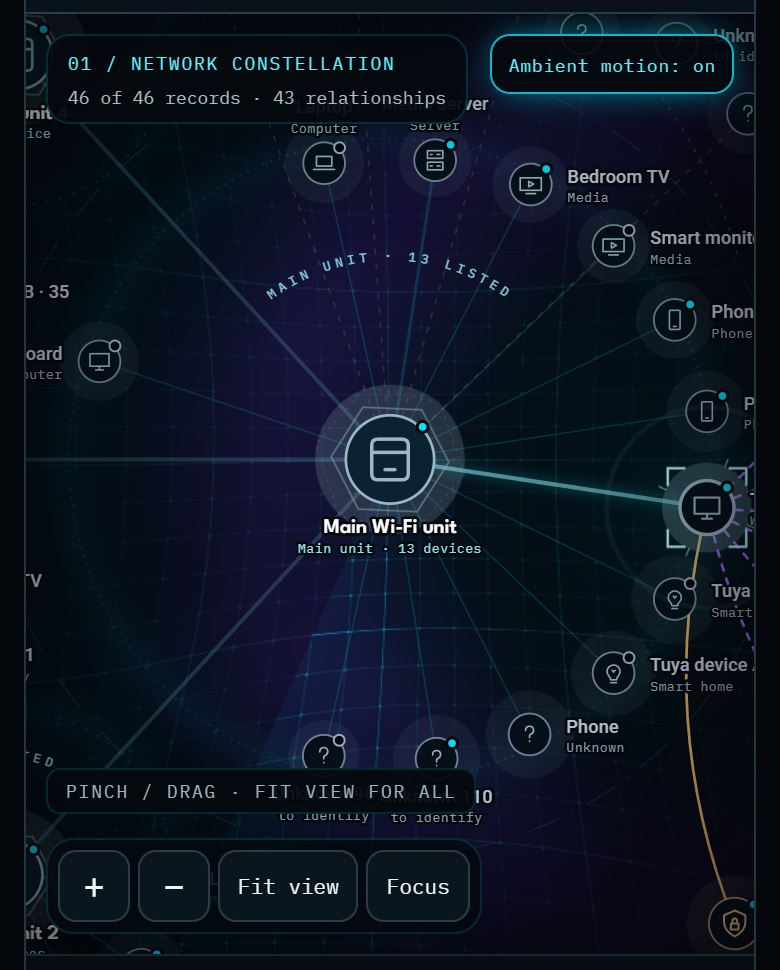
The first map put 46 devices in two rings around the router and ignored which Wi-Fi unit each one used, so the labels piled on top of each other. It was honest, and it was hard to read. So I handed it to Claude with that one line.
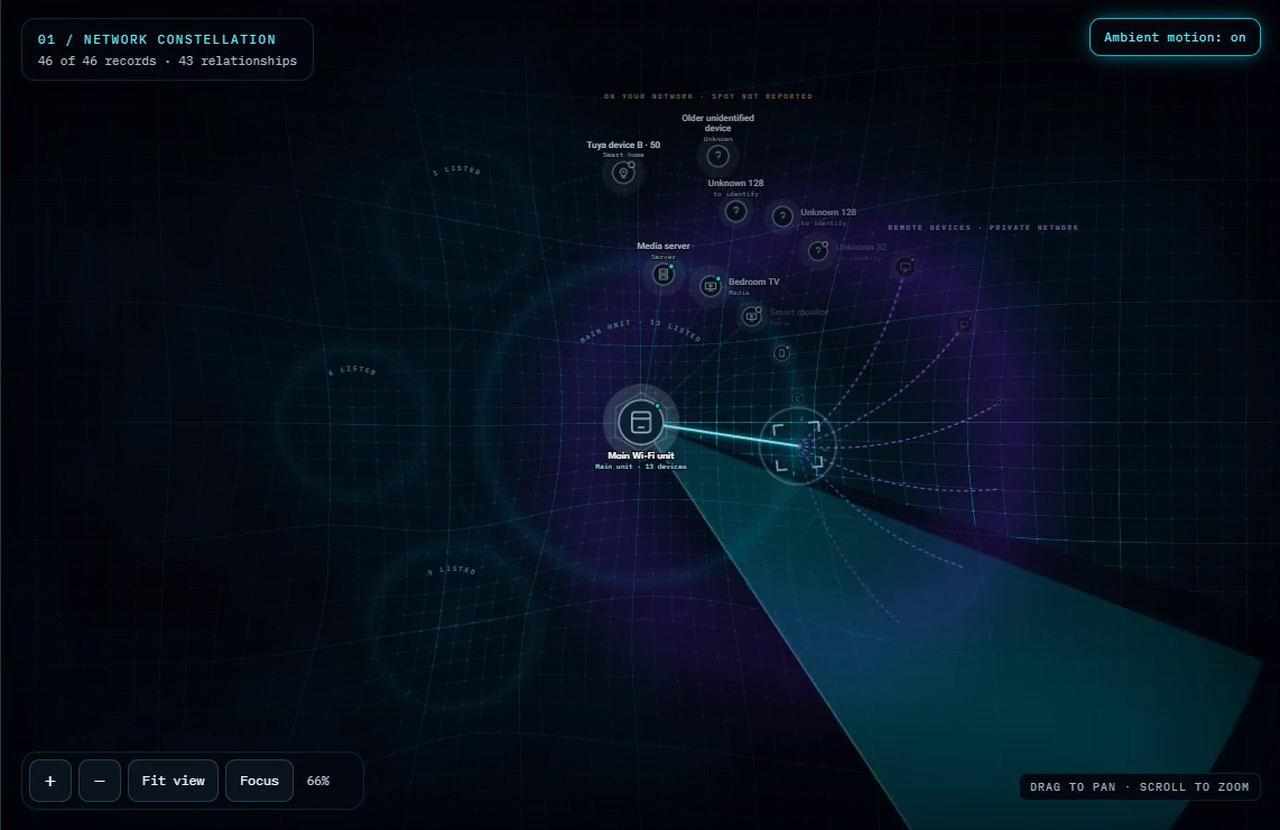
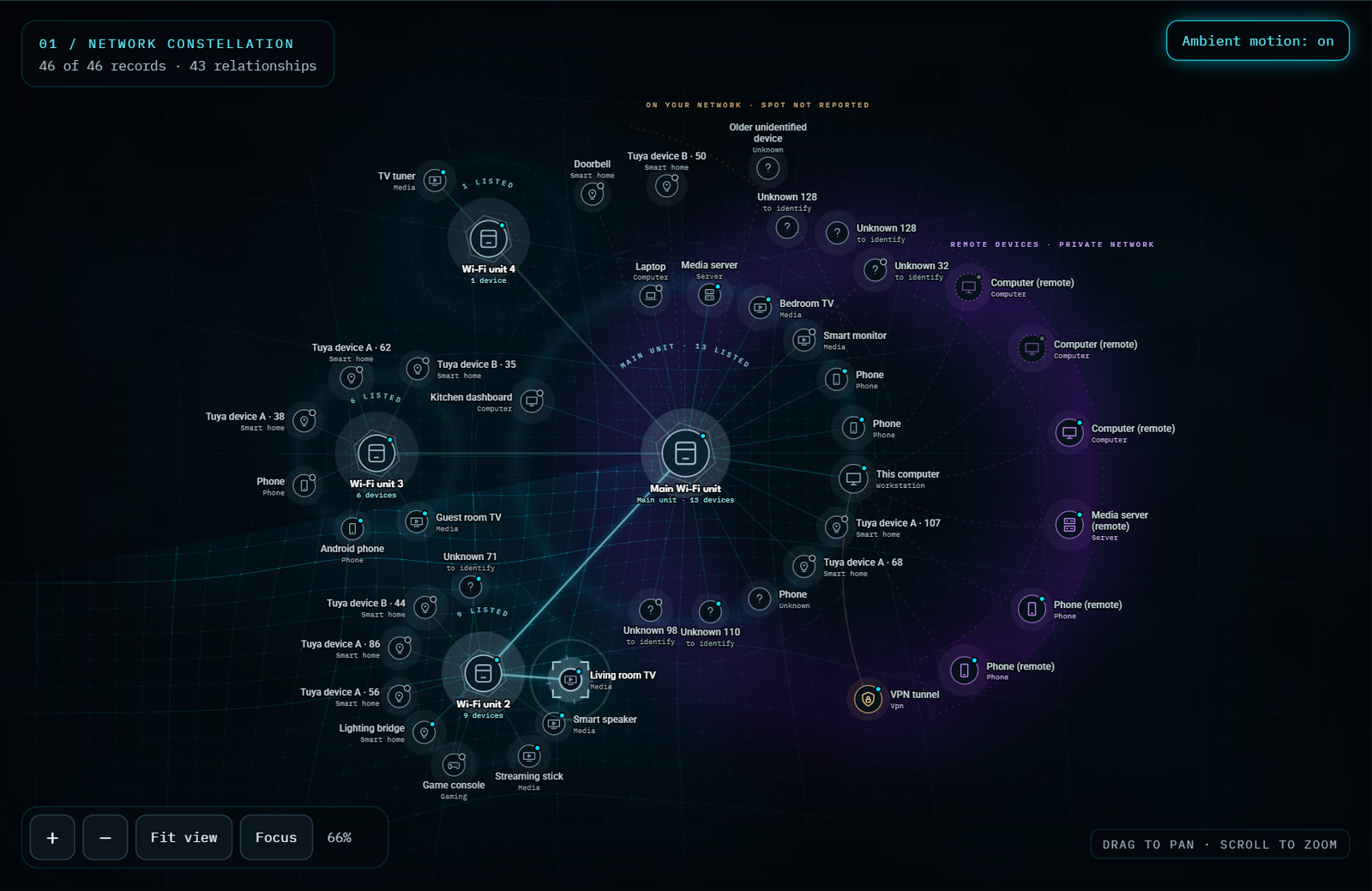
Claude rebuilt the map around the router’s own answers. The main unit sits in the middle, the other three units orbit it, and every device sits on the ring of the unit it actually uses. Devices the router won’t place get their own amber arc. Remote devices fan out from the PC. A pass at the end nudges every label until none of them overlap, and switching between Simple and Technical never moves a device.
Then the motion, because I asked for it. Behind the map runs a grid drawn on the graphics card that pans and zooms with the devices, dips into a soft well under each Wi-Fi unit, breathes, and leans toward the mouse. A radar sweep circles the main unit. Select a device and brackets lock onto it while its path back to the main unit lights up. The legend says it plainly: the light is decoration, and none of it is Wi-Fi range or traffic.
Built for a bad internet day.

The top of the page is a status deck. Check connection tests this PC, the router, a website name lookup and one real web request, then lights a lamp for each. Under it sits a troubleshooting guide by symptom: the internet isn’t working, a device is missing, streaming is slow, remote access isn’t working. Each one is three plain steps.
The safe fixes are buttons. Refresh devices looks again. Repair atlas rebuilds the map from the notes file. Reset this view clears the filters. None of them restart the router, change the Wi-Fi or disconnect anything, and the page says so right under them.
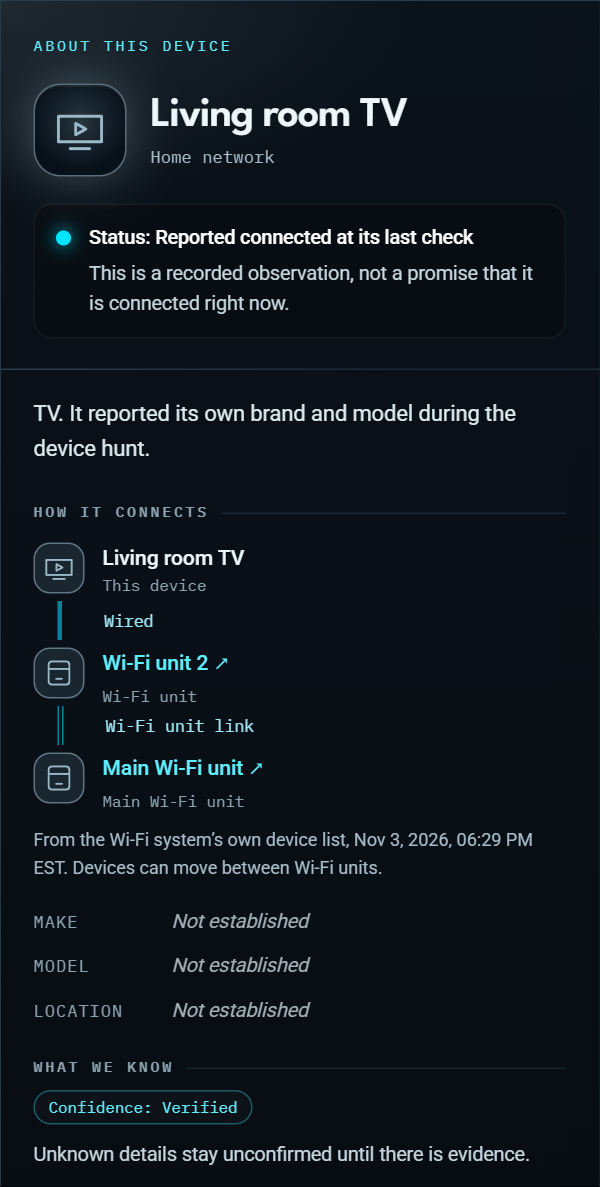
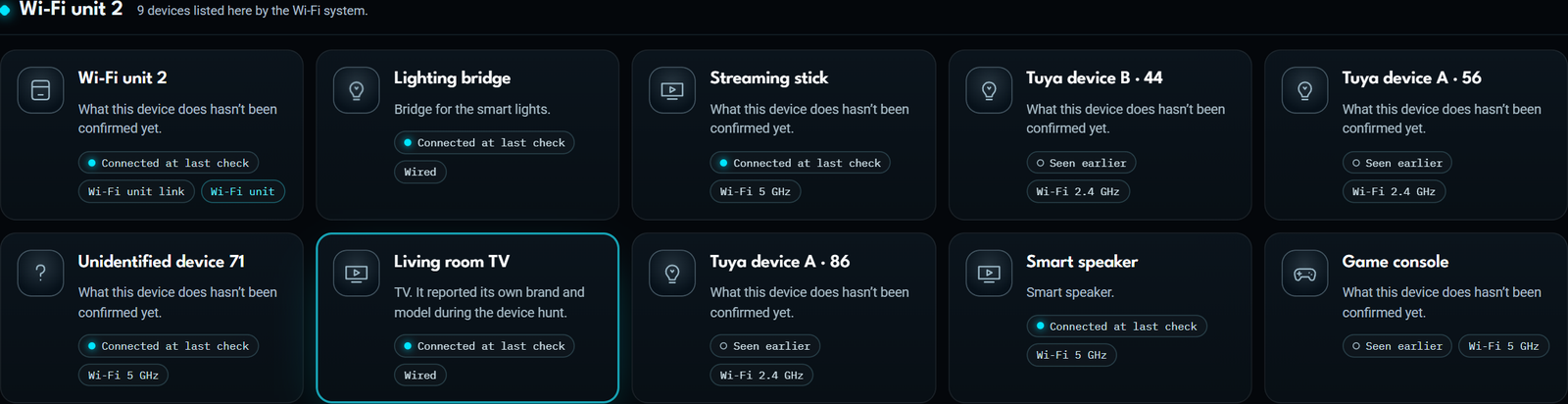
Every device gets a card, grouped by the Wi-Fi unit the router says it uses, with remote and unplaced devices in their own groups. Select one and the side panel shows how it connects, hop by hop, with the date the router reported it. Devices can move between units, so it says that too.
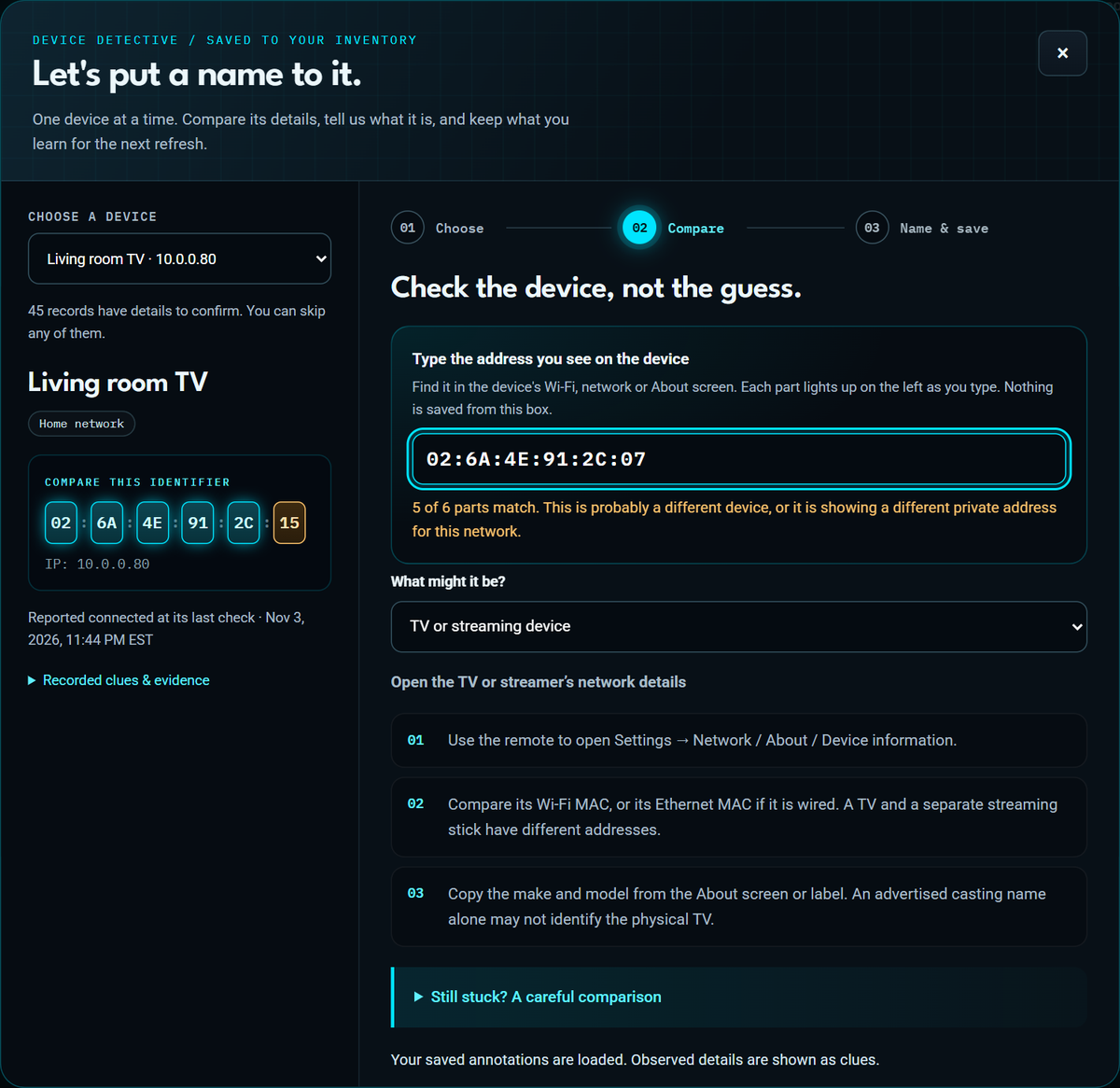
Check the device, not the guess.
Identify devices walks through the unknowns one at a time in three steps: choose, compare, name and save. The compare step has a guide for each kind of device, like where a TV hides its network details or why a phone shows a different address for each Wi-Fi network.
The strongest match is the device’s hardware address. The record shows it as six boxes. Type what the phone or TV screen says and each box lights up cyan if it matches or amber if it doesn’t. An exact match offers to fill in the “how did you identify it” note for you.
Saving writes only the fields that changed into the notes file, adds a dated note about where the fact came from, and rebuilds the map. If someone else changed the same record in the meantime, the save is refused and nothing in the form is lost.
“By any means you can. Gotta be some open source tool.”
After the redesign, 26 devices still had generic names or no make. So I asked Claude to find them by any means it could, where Codex hadn’t. The rules didn’t move: read only, nothing logged into, nothing switched on or off, and no addresses sent anywhere off the PC. A Claude agent spent about 18 minutes listening and asking politely.
A TV named itself. It showed up only under the name of the company that made its network chip. But the TV publishes a small music-streaming info page on the home network, and that page answers with the TV’s own brand and model. It’s the only record that went to “confirmed” that night, because the device itself said so.
The nine “wlan0” devices are Tuya. Each one broadcasts Tuya’s local smart-home protocol with its own device ID, and they fall into two product groups, six and three. Tuya’s software runs inside a lot of plugs, bulbs and switches, but the broadcast doesn’t say which, so the make stays blank. The fix takes five minutes: the Smart Life app shows a Virtual ID for each device, and every record now has its ID written down to match.
Two phones said Android. Their network names answered as Android devices, which fits one guess and narrows the other.
Everything else stayed quiet: a laptop, a game console, a couple of smart-home gadgets, a doorbell that sleeps, a few phones. Phones and laptops don’t announce themselves, and that silence proves nothing.
What broke, and what fixed it.
- The port was taken. Another app on the PC already had the first port the atlas wanted. That app was left alone, and the atlas got a different port.
- The router’s list changed while it was being read. It said 29 devices, then 30. The doorbell was in the first read and gone from the last. Both versions were kept as they were, with no smoothing.
- Two hardware addresses for one TV tuner. The PC remembered a different hardware address at the tuner’s spot than the router reported. The old one stayed as its own “historical” record instead of being merged on a hunch.
- Quiet passes erased names. Rebuilding twice after a quiet scan could drop what an earlier scan had found. A test now rebuilds the same input twice and checks that nothing disappears.
- A save could lose a hand edit. A review by another AI agent found that an edit to the notes file at the exact moment of a save could vanish. Saves now keep a private recovery copy, and the review found two more save bugs that are fixed too.
- The labels piled up. Two rings, 46 devices. That one took the redesign.
- A test caught the redesign. A style that printed a label in capitals changed the text a test reads. The label went to small capitals, which look the same and read the same.
- A hunting tool crashed. tinytuya’s own scanner couldn’t get its port because another program on the PC had it. Its decoder ran on a separate listener instead.
- The pictures on this page tried to leak. The script that made them checks the data and the visible text for real names and addresses before every shot and stops if it finds one. It stopped itself three times. Two were false alarms. The first was real: a link label still named our remote-access service.
One evening, start to finish.
- Motion, and the device hunt.
I asked for some motion and for the rest of the devices. Motion went on by default, off for anyone who asks for less. The hunt turned up new evidence on 12 of 26 devices, and the open questions dropped from 28 to 27.
- The brain melt pass.
Claude rebuilt the look and the map around the router’s answers. Every test still passed afterward, including one that caught a change it made.
- Naming devices.
Codex built the Identify walkthrough that saves to the notes file, with conflict checks and recovery copies. A separate review caught three save bugs before it shipped.
- Receipts.
With my OK, Codex searched my own purchase receipts and project notes. Nine records got better notes. None were confirmed by a receipt alone.
- A live app for my wife.
Simple and Technical modes, Check connection, Repair, a desktop shortcut and the five-minute refresh. Claude Sonnet reviewed it through TeamLoop.
- The router’s side.
I signed in to the router’s page, and Codex read the device lists and the mesh map. All four Wi-Fi units matched exactly.
- The first map.
Codex did the discovery, the notes file and the first map, then had Claude Sonnet review it through TeamLoop. The review found that a note you cleared could come back. It can’t now.
What is still open.
- Nine Tuya devices. Match each Virtual ID in the Smart Life app and give them real names.
- The quiet ones. Wake them, refresh, and look again. Some only announce themselves now and then.
- Real-device speed. The motion has only been measured in test browsers. The real PC and phone are next.
- The verdict. Whether my wife reaches for it the next time the internet goes out.
A map is not the house.
Checked so far
37 backend tests cover the server’s safety checks, saves and the inventory rules. 50 browser checks across three suites cover search and filters, offline use, phone widths, Simple and Technical modes, the naming walkthrough with a test save, and the live tools, with no automated accessibility violations or outside-site requests observed during those browser checks. That is evidence about the tested flows, not a complete accessibility or privacy audit. The router confirmed all four Wi-Fi units by model and address.
Not proven yet
This is a map of what the network admits to, not proof that every device was found. Sleeping devices, guest networks and smart-home gadgets that hide behind a hub can be missing. 27 questions are still open. How smooth the motion runs on our real PC and phone hasn’t been measured. And the review that counts is still pending: my wife, on a bad internet day.
About the pictures. Every picture and the clip on this page come from the real app, running on a scrubbed copy of the data: made-up device names, fake addresses and IDs, makes and models removed, and our router, remote-access and VPN services left unnamed. The real map never leaves the PC.
Record assembled from the project’s own notes (context, decisions, design and device evidence) and the night’s test reports, through November 3, 2026. Built by Mark Salisbury with AI collaborators: Codex built the discovery, the router read, the notes file, the first map, the live app, the receipts search and the naming walkthrough, with its own worker agents and reviews by Claude Sonnet through TeamLoop. Claude did the brain melt pass, the motion and the device hunt with a Claude Sonnet agent, made the scrubbed pictures, and wrote this record.
Public record revised . Application and device checks retain the dates, builds and conditions described in this record.